Add Perkmon to Chrome
Automatically bring supported issuer offers and loyalty snapshots into Perkmon, then track expirations, card matches, reminders, and usage in one place.
You always sign in on the issuer's own website. Sensitive fields are minimized on your device before upload. Perkmon stores only the offers and account snapshots you explicitly choose to sync.
Everything the extension can do — and exactly what it touches
Most capabilities only read issuer data and write to Perkmon. Offer enrollment is the exception: it can modify eligible bank accounts only after you enable it and initiate the action.
Offer enrollment
Enabling this allows user-initiated enrollment of selected American Express and Chase offers and modifies eligible bank accounts.
What it touchesModifies eligible bank accountsSync offers
Read the card-linked offers on your issuer's site and save them to your Perkmon wallet. Read-only — your bank account is never modified.
What it touchesReads issuer · Writes PerkmonSync balances & points
Read your points, status tier, and credit balances to show them in Perkmon. Read-only — your bank account is never modified.
What it touchesReads issuer · Writes PerkmonTrack benefit usageBeta
When your issuer shows a credit as used, Perkmon asks you to confirm before updating your tracker. Nothing is written until you confirm.
What it touchesYou confirm each changeMerchant reminders
When you visit a store with a matching offer, show a small reminder on the page. It shows only the merchant, issuer, and offer value — never your card number.
What it touchesShows on other sites · Display-safe only
Manage Amex offers from one console
Offer Console gives rewards maximizers a single working surface for Amex offers: scan the full list, narrow it by status or card, act on eligible offers, then send reviewed results back to Perkmon.
- Search, filter, and sort Amex offers without jumping between card tabs.
- See card-level availability before deciding where an offer should be added.
- Use explicit add actions only when you choose to enroll an eligible card.
- Sync reviewed offers back to Perkmon so expirations and card matches stay organized.
Offer actions stay explicit. Perkmon shows the eligible cards and available action; nothing changes on Amex until you choose the add action yourself.
Built so your data stays yours
The extension reads supported offer and account snapshot data only when you start a sync. Offer enrollment changes only the eligible issuer offers you select after you enable it and initiate the action, and we do not store bank passwords, security codes, full card numbers, or unrelated page content.
Synced data is handled on modern managed infrastructure from a major cloud provider, with encryption in transit and at rest through our infrastructure providers.
No bank passwords
You sign in directly with each issuer. Perkmon never sees or stores bank passwords, security codes, or full card numbers.
You're always in control
You choose when to run a sync, review what was found, and save only the offers, account snapshots, and best-effort card matches you confirm before saving.
Permissions, explained
Some providers need site permission so the extension can read supported content from pages you open. Sensitive fields are minimized on your device before upload.
See exactly how a sync works
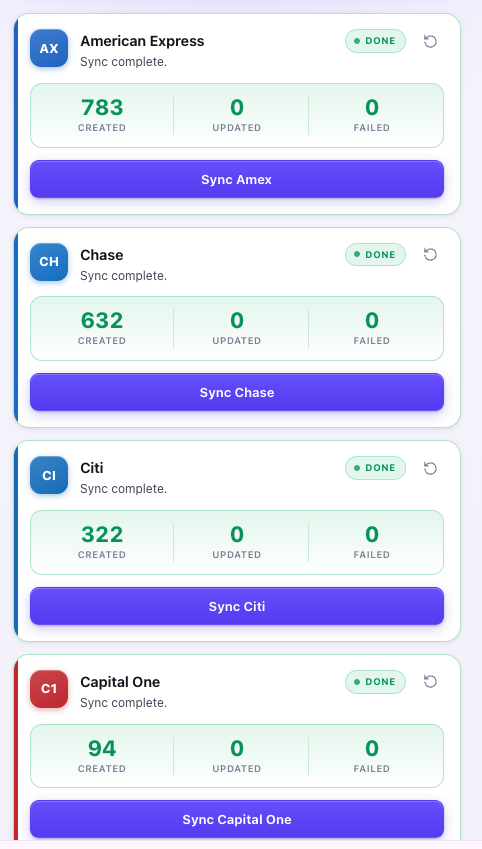
Every step happens in front of you: choose a provider, review what was found, check best-effort auto matches, then save to your Perkmon account.
Sync issuer offers from the extension
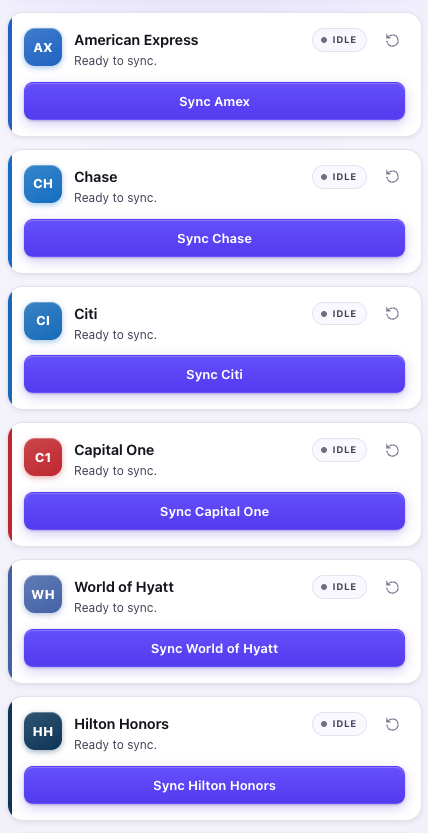
Open the Perkmon side panel in Chrome, choose an issuer or loyalty provider, and send eligible offers and account snapshots into your Perkmon account.
Review synced offers in Perkmon
Synced offers show up in Perkmon with source cards, activation notes, expiry dates, and direct action links.
Auto-match cards with best-effort fallback
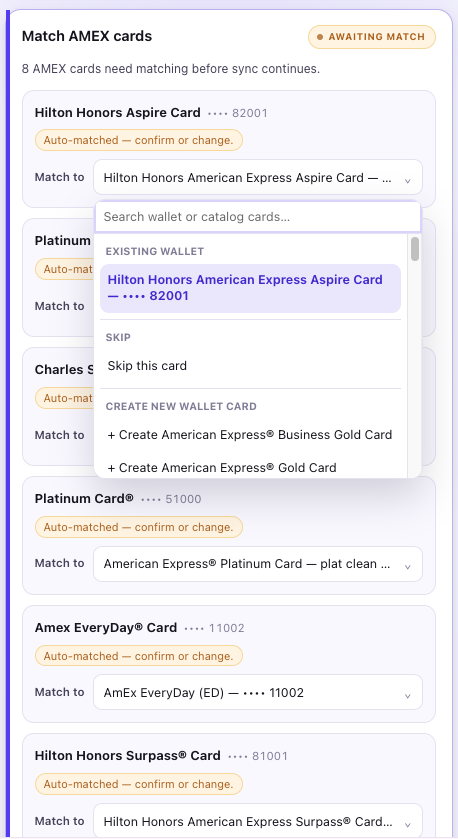
Perkmon suggests best-effort card matches automatically. Confirm, change, skip, or create a catalog-backed card before syncing.
Add an offer to all your cards at once
On Amex, Perkmon adds an “Add to N cards” button next to each offer. One click enrolls that offer on every eligible card — exactly the cards shown on the button. Off by default; turn it on when you want it.
Bring your card offers into Perkmon
Install from the Chrome Web Store and sign in with your Perkmon account. You sign in on each issuer's own site — no bank passwords are ever stored.
Add to Chrome